
























When a text pipeline behaves unexpectedly, inspect one known word from encoding to bytes and back. This guide uses the literal precomposed Café to compare Qorivo.cc’s related converters, confirm every representation, and identify why visible characters, Unicode code points, and encoded bytes are different things.
Start with the Legacy ASCII Label
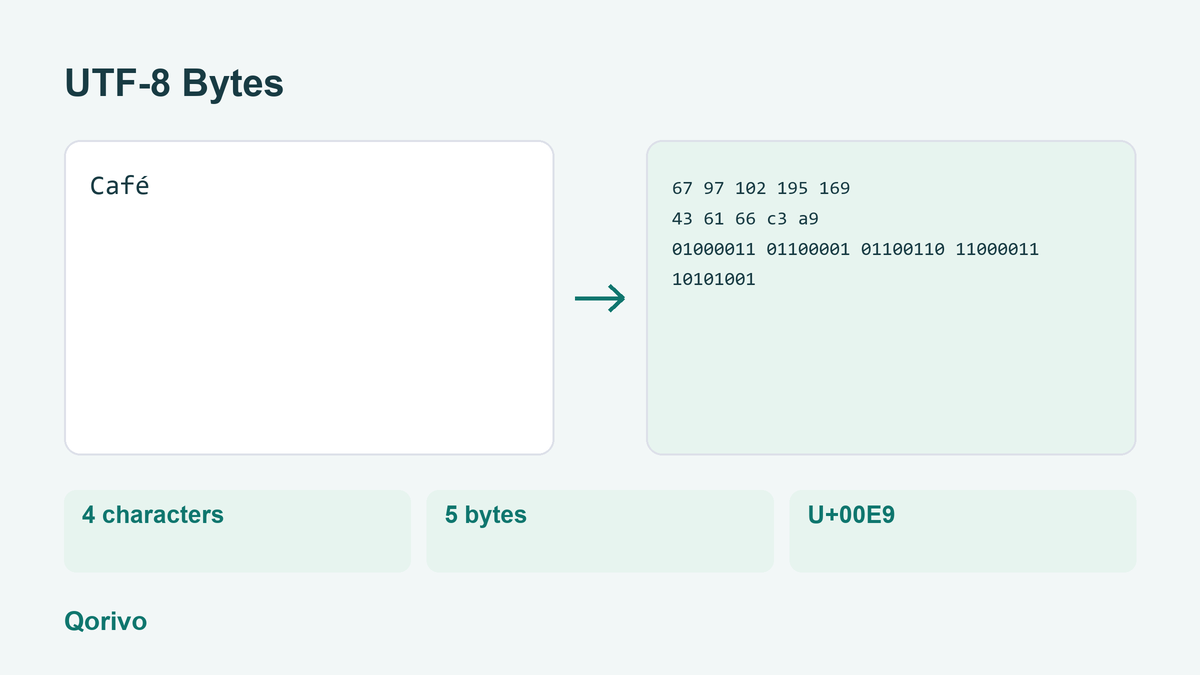
Paste the literal precomposed Café into Text to ASCII. Despite its legacy name, the tool displays decimal UTF-8 bytes, not Unicode code points and not strictly ASCII once values exceed 127. The first three bytes represent C, a, and f. The final two bytes belong together as é, producing five byte values for four visible characters.
67 97 102 195 169Use the displayed result as the first fixture for verification. ASCII to Text should accept 67 97 102 195 169 and return Café. The reverse check proves that 195 and 169 are not two visible characters; together they form the final é. Every input byte must be between 0 and 255, and the complete sequence must be valid UTF-8.
Compare Hex and Binary Views
Text to Hex gives the same bytes in hexadecimal, using two digits per byte. Its compact output is 436166c3a9; for inspection, read it as 43 61 66 c3 a9. Text to Binary expands those same five bytes into eight-bit groups. The first three groups encode the ASCII-subset letters, while the final two encode é.
436166c3a9
43 61 66 c3 a9
01000011 01100001 01100110 11000011 10101001
Enter the five binary groups in Binary to Text, with a space between each group. Then try both hexadecimal forms in Hex to Text. Each result should read Café. If a pasted value fails, compare the groups from left to right before trying to correct the output. A missing digit can change the byte boundary and affect more than one letter.
When matching text has different bytes
é is one Unicode code point, U+00E9, but its UTF-8 encoding uses two bytes, c3 a9. By contrast, ASCII-subset letters such as C, a, and f use one byte each. A combining form can look identical to precomposed Café while producing different bytes. Therefore, visual comparison alone cannot verify that two strings are encoded identically.
Malformed input also matters. The byte c3 alone is an incomplete UTF-8 sequence, so it cannot represent the complete é and may trigger an error when decoded. Binary to Text expects byte groups made only of 0 and 1, while Hex to Text expects complete hexadecimal bytes. These tools inspect encoded data; they do not turn a whole number into text.
Round-trip checks for the sample
- Keep the source exactly as Café, including the precomposed é.
- Verify 67 97 102 195 169, 436166c3a9, and the five binary groups.
- Reverse the decimal, binary, and spaced or compact hex fixtures and confirm Café.
