
























This guide shows how to display an existing HTML sample as text, decode it once, and keep that result in a text-only context. The specimen is <p>Tea & coffee</p>, which contains tags and an ampersand. You will compare the encoded and decoded forms without rendering the markup.
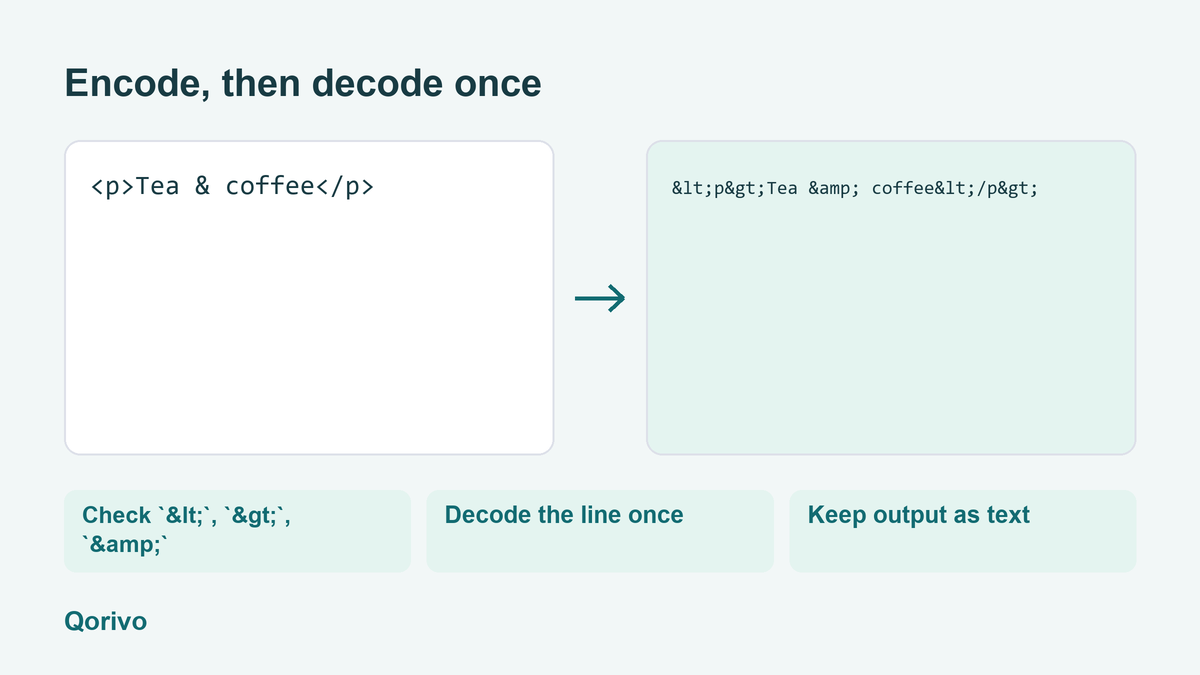
Start with the Existing HTML Sample
The task begins with source that already exists: <p>Tea & coffee</p>. Treat the line as plain text, including both tags, the space, and the ampersand. Do not first edit the sample or remove its punctuation, because those exact characters are what the encoding step must preserve or represent.
Use html-encode when the goal is to show HTML markup literally inside HTML text content. Copy the specimen as the tool's sample input. The expected transformation changes < to <, > to >, and & to &, while the words Tea and coffee remain readable.
<p>Tea & coffee</p>Encode the Markup for Display
Run html-encode with the source value <p>Tea & coffee</p>. Examine the complete result rather than only the opening tag. Confirm that both angle brackets are represented as entities and that the ampersand is also represented. This gives you a display form that reads as code instead of markup.
Next, use html-decode with the encoded line <p>Tea & coffee</p>. Keep every entity intact before decoding, and perform this operation once. The expected output is <p>Tea & coffee</p>, restoring the literal characters from the encoded text sample.
<p>Tea & coffee</p>Read and Verify the Result
The encoded output is <p>Tea & coffee</p>. Its visible entity references show that the original tags and ampersand were converted for text display. The words remain unchanged, so the transformation is easy to compare with the starting specimen.
The decoded output is <p>Tea & coffee</p>. Check the opening <p>, closing </p>, and the ampersand between the words. Decoding restores characters in the text; it does not by itself turn the result into safe or intended content for rendering.
Know the Boundary and Reuse Safely
This workflow is for HTML text content when you need markup to appear literally. Other output contexts may require different escaping rules, so do not assume that html-encode is suitable everywhere. The example also does not claim to sanitize, validate, or approve arbitrary HTML.
Reuse the pattern by preserving the original sample, encoding it for the text-only destination, and decoding only when literal entities must be recovered. If the content will later be rendered, stop and apply the controls required for that context; decoding alone is not a safety check.
- Confirm the result contains
<,>, and&. - Decode the encoded sample exactly once.
- Keep decoded markup in a text-only context unless separately handled.
